📋 開始前確認
- ✅ 已安裝 OpenClaw(還沒裝?點這裡)
- ✅ 有 Telegram 賬號(手機號注冊,免費)
- ✅ 可以在 Telegram 裡搜索和發消息
通過 BotFather 創建 Bot
BotFather 是 Telegram 官方的 Bot 管理工具,完全免費
在 Telegram 裡找到 BotFather
打開 Telegram,搜索 @BotFather(注意一定要有藍色認證標志 ✅)
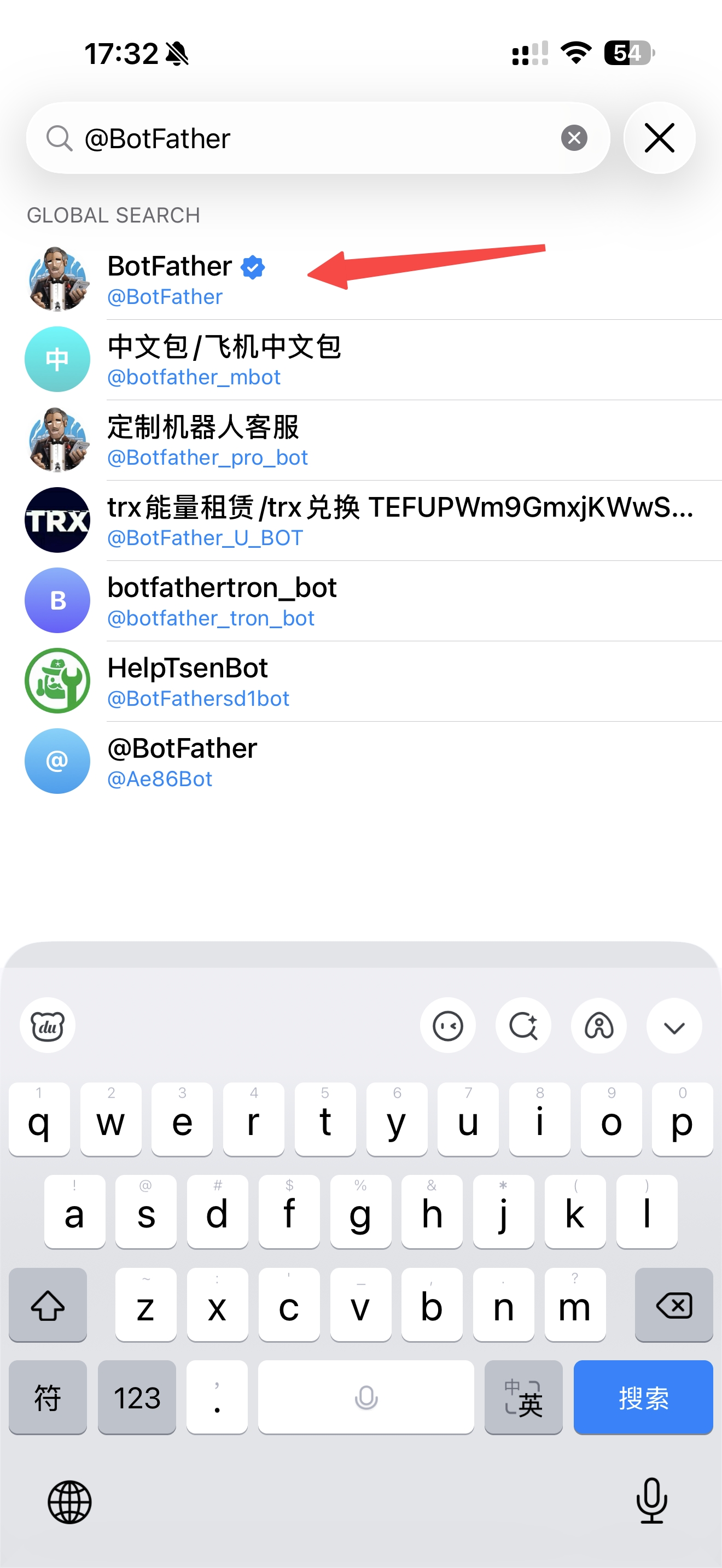
BotFather
@BotFather · ✅ 官方認證
對照截圖,只選有藍色 ✅ 認證標志的那個
⚠️ 注意認證標志!只有帶藍色 ✅ 的才是官方 BotFather,有假冒賬號會騙取 Token。
發送 /newbot 命令
給 BotFather 發送這條消息:
BotFather 會依次問你兩個問題:
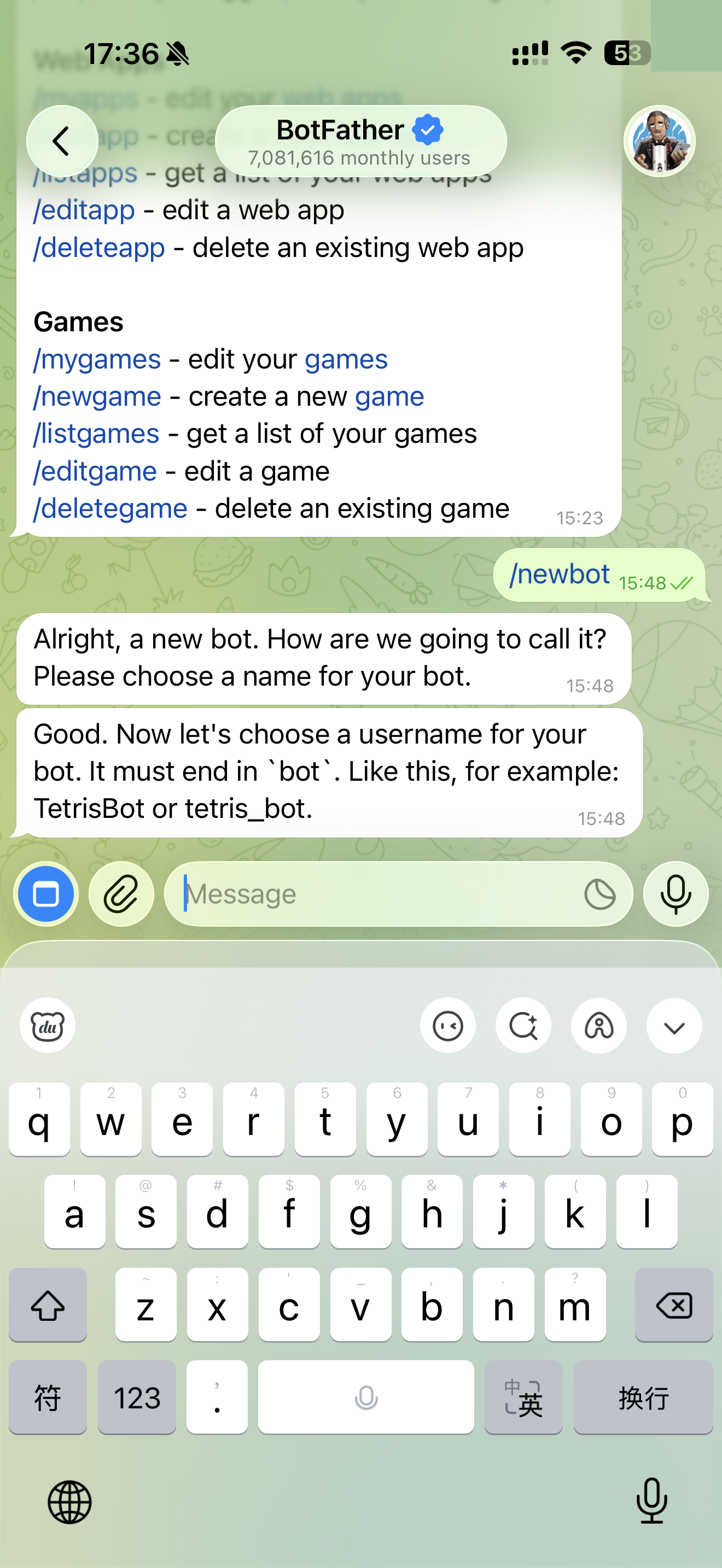
BotFather 問:
Alright, a new bot. How are we going to call it? Please choose a name for your bot.
(請給你的 Bot 起個顯示名稱)
你回復(示例):
我的AI助手
BotFather 又問:
Good. Now let's choose a username for your bot. It must end in `bot`. Like this, for example: TetrisBot or tetris_bot.
(Bot 的用戶名,必須以 bot 結尾)
你回復(示例):
MyAIAssistant_bot
複製 Bot Token
創建成功後,BotFather 會給你一段 Token,立刻複製保存!
BotFather 回復:
Done! Congratulations on your new bot. You will find it at t.me/MyAIAssistant_bot. You can now add a description, about section and profile picture for your bot, see /help for a list of commands. By the way, when you've finished creating your cool bot, ping our Bot Support if you want a better username for it. Just make sure the bot is fully operational before you do this.
Use this token to access the HTTP API:
1234567890:AAHxxxxxxxxxxxxxxxxxxxxxxxx-xxxxxxx
Token 格式
數字:字母數字組合
示例
123456789:AAHx...xxx
⚠️ Token 很重要!不要洩露,不要截圖發群裡,丟了可以在 BotFather 用 /revoke 重新生成。
把 Token 發給 AI,自動完成配置
不需要打開終端,直接把 Token 發給 AI,它幫你配好
把 Bot Token 發給 AI 助手
直接在對話框裡發送 Token,AI 會自動配置並啟動網關
Token 格式示例:
⚠️ Token 很重要:不要截圖發群裡,丟了可以在 BotFather 用 /revoke 重新生成。
等待 AI 自動配置完成
大約 5 秒,AI 會自動寫入 Token 並啟動網關
# AI 助手會回復:
✅ Token 已配置,網關已啟動!繼續下一步 👇
✅ 看到這條消息就說明配置成功了!
測試 & 開始使用
在 Telegram 找到你的 Bot,發第一條消息
在 Telegram 裡找到你的 Bot
搜索你剛才創建的 Bot 用戶名(@xxx_bot)
@MyAIAssistant_bot)
批准配對(首次)
第一次發消息,Bot 會回復配對碼,在終端裡批准
Bot 回復示例:
請在終端運行以下命令批准配對:
openclaw pairing approve telegram XYZ789
💡 配對只需要做一次。
🎉 開始使用!
Telegram AI 助手已就緒
💡
問問題
「解釋一下區塊鏈是什麼」
🌍
翻譯
「幫我把這段中文翻譯成英文」
📊
分析
「幫我分析這份數據的趨勢」
🚀 進階:加到群組使用
- ① 在群組設置裡邀請你的 Bot 加入
- ② 默認需要 @Bot 名字 才會觸發回復
- ③ 發
@BotFather→/setprivacy→ Disable,讓 Bot 看到所有消息
🙋 常見問題
Bot 不回復消息,怎麼辦? ▼
- 檢查網關:
openclaw gateway status - 查看日誌:
openclaw logs --follow - 確認 Token 沒有填錯(重新運行
openclaw channels add) - 確認你的賬號已通過配對
Token 丟了或洩露了怎麼辦? ▼
去 BotFather 立刻吊銷舊 Token:
選擇你的 Bot → 確認吊銷 → 複製新 Token
然後重新運行 openclaw channels add 填入新 Token。
重啟電腦後 Bot 不響應了? ▼
重啟網關即可:
設置開機自啟:
在中國大陸能用 Telegram Bot 嗎? ▼
OpenClaw 需要訪問 api.telegram.org,國內需要通過代理才能連接。
如果你在香港、台灣、海外等地區則沒有限制,直接使用即可。